Pytorch, YOLOv5 로 Fruits, Vegetable Detection 하는 모델 학습 시키기
Note :윤동글님의 딥러닝 게시물보고 참고
내 컴피터 같은 경우는 2018형 맥북 프로 15인치 쓰는중
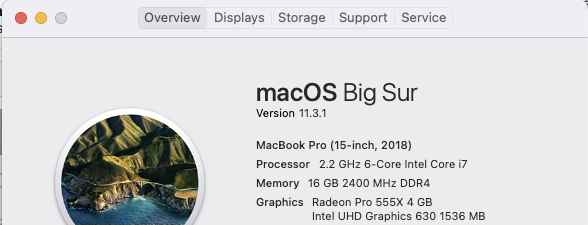
작년 졸프 부터 시작해서 지금까지 컴퓨터가 너무 고생중이다 ㅠㅠ
이 학습 시키는 이유는 학부 수업중에 인공지능응용시스템 수업이있는데 여기서 기말 프로젝트로 진행중인게 있다. 약간 큰 그림은 시장이나 카트에 가서 핸드폰으로 야채나 과일을 카메라로 찍고, 거기서 디텍션 된거를 클릭하면 그 재료를 통해 만들 수 있는 전세계 요리를 랭킹 높은거부터 추천해서 보여주는 어플.. 좀 냄새나긴 한데 하번 꽂힌 이상 진행을 해야하므로 하고있다.
1) roboflow에서 데이터셋 다운받기
kaggle에서도 데이터셋을 찾았는데 360도의 과일이랑 야채 이미지를 직접 찍어서 저장해놓은 데이터였는데 뭔가 현실성도 없는 거같고 데이터가 너무 못생긴거같아서 새로 데이터를 roboflow에서 찾아서 해봤다. 근데 여기서 찾은 fruit데이터도 쪼오끔 못생겼다. 일부로 과일들을 여러 배경사진에 합성한 데이터들이다. 그래서 데이터셋들 보면 다 현실에 없을거 같이 생긴 이미지들이다. 사이트에 들어가서
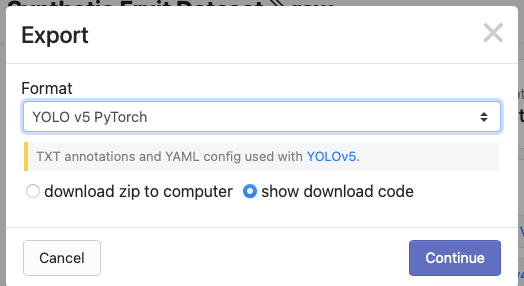
다운로드 누르면 export할 포맷이랑 직접 컴퓨터에 다운받을지 아니면 curl로 다운받을지 고르고 넘어간다. 그러면 코드 다운로드 할 수 있는 명령어들이 나오는데 나는 GPU없는 맥북프로따리 이므로 구글 코랩을 써야한다.
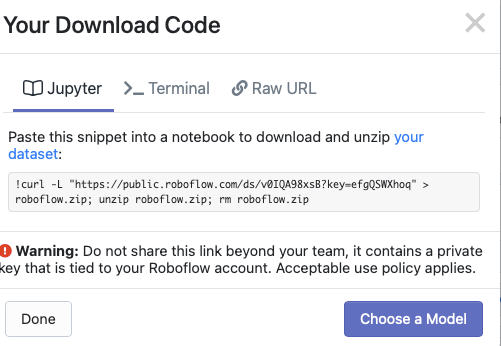
그 다음에 명령어 복사해서 구글 코랩에 새로운 노트를 만들고 새로운 코드 라인 추가하고 거기에 붙여넣기 해서 cmd + enter 키로 실행을 해서 데이터를 다운 받는다.
!curl -L "https://public.roboflow.com/ds/v0IQA98xsB?key=efgQSWXhoq" > roboflow.zip; unzip roboflow.zip; rm roboflow.zip
[1;30;43m스트리밍 출력 내용이 길어서 마지막 5000줄이 삭제되었습니다.[0m
extracting: train/labels/2126_jpg.rf.31b8e6dc4420419efd473a6107107b3d.txt
extracting: train/labels/953_jpg.rf.3237a6da506b0e14519398ac5154df88.txt
extracting: train/labels/536_jpg.rf.32447c4f1a00e8b7f5704ccb90e9bf2c.txt
extracting: train/labels/4110_jpg.rf.32d576a4ea056c5a68766c05ff964361.txt
extracting: train/labels/2343_jpg.rf.32b08b67e8824f3ac03a5e75eecc2292.txt
extracting: train/labels/598_jpg.rf.32811e5c5883b63779507b987339832a.txt
extracting: train/labels/609_jpg.rf.32803d9828f5ee48533818bdb66cffd2.txt
extracting: train/labels/3918_jpg.rf.33bfb3d4c7892bee8167a6133fa23d92.txt
extracting: train/labels/3953_jpg.rf.33d552e896c787e0b0f8db8bcf16f0be.txt
extracting: train/labels/4298_jpg.rf.33d643dbd5ca04071faaf0f14ca87e3e.txt
extracting: train/labels/353_jpg.rf.339b8e989069e97c1c62525bdec9c257.txt
extracting: train/labels/3739_jpg.rf.340ad28a1528db849c24760324287a74.txt
extracting: train/labels/4098_jpg.rf.33cb2da1f0f5caa65f53d38d89ef61a7.txt
extracting: train/labels/4552_jpg.rf.3410c00fa30ab99bb264ee44222cff2f.txt
extracting: train/labels/4195_jpg.rf.33a4b1d2dc39b8768645e2359dbb0538.txt
extracting: train/labels/4223_jpg.rf.33d51fd8025b8004eafe3bfadcd8443c.txt
extracting: train/labels/138_jpg.rf.33671845fbc056e3408ab11244a99d55.txt
extracting: train/labels/3108_jpg.rf.33a2aeb2c2bb88b4354b656bd401ad4e.txt
extracting: train/labels/1417_jpg.rf.3422303d648124885afeec044ba2a6ab.txt
extracting: train/labels/1516_jpg.rf.3348715b9a873faadc59add0366846da.txt
extracting: train/labels/2867_jpg.rf.33c33e097a6ae39e3d33400a7bbf7c18.txt
extracting: train/labels/666_jpg.rf.33408435197b060524af7973f6dc1484.txt
extracting: train/labels/2075_jpg.rf.33621436b8066fd077d8ad2c872c26d1.txt
extracting: train/labels/4939_jpg.rf.3371252411afa94ce030d3b8c87c214a.txt
extracting: train/labels/4127_jpg.rf.33d1b1858335744b56105209d98d99c0.txt
extracting: train/labels/131_jpg.rf.34390bf355f642a8203915e88811db71.txt
extracting: train/labels/3255_jpg.rf.344c81bd1b8d75a06772bf6e32ce64f2.txt
extracting: train/labels/4601_jpg.rf.34cfb7887200adb425ee83a93c4c3e4f.txt
extracting: train/labels/628_jpg.rf.34c13bab5ec120f534267ddbd24a55b9.txt
extracting: train/labels/3260_jpg.rf.3490a1ee74073bbc0f2d0836cf6affe2.txt
extracting: valid/labels/638_jpg.rf.ffe31c27975ab63b09a371e01b43fd83.txt
extracting: valid/labels/651_jpg.rf.ffbfa67df9427041c5c6ea8e92783a10.txt
extracting: README.roboflow.txt
extracting: README.dataset.txt
2) Yolov5 세팅
yolov5 선생님 깃 허브에 들어가서 clone하고 requirements.txt실행시켜서 필요한 것들 install 하고 세팅하기.
clone은 그냥 contents에 하는 것 같아서 그냥 여기다 해버리기~
그리고 torch import 해주고, 잘 세팅 되있는지 version 체크해주기
%cd /content
!git clone https://github.com/ultralytics/yolov5
%cd yolov5
%pip install -qr requirements.txt
/content
Cloning into 'yolov5'...
remote: Enumerating objects: 6233, done.[K
remote: Counting objects: 100% (27/27), done.[K
remote: Compressing objects: 100% (20/20), done.[K
remote: Total 6233 (delta 10), reused 14 (delta 7), pack-reused 6206[K
Receiving objects: 100% (6233/6233), 8.45 MiB | 10.97 MiB/s, done.
Resolving deltas: 100% (4268/4268), done.
/content/yolov5
[K |████████████████████████████████| 645kB 7.7MB/s
[?25h
import torch
from IPython.display import Image, clear_output
clear_output()
print(f"Setup complete. Using torch {torch.__version__} ({torch.cuda.get_device_properties(0).name if torch.cuda.is_available() else 'CPU'})")
Setup complete. Using torch 1.8.1+cu101 (Tesla T4)
3) 데이터 정리하기!
위 코드로 데이터를 받으면 /content안에 자기들 맘대로 저장이 돼있을 것이다. 이것을 정리를 해줘야한다 나같은 경우에는 그냥 fruit_data로 폴더 하나 만들어서 여기에 다운받은 train, valid 폴더랑 data.yaml 넣어주었다. 나머지 readme 같은거는 굳이!
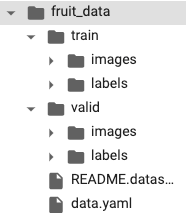
폴더에다 데이터 예쁘게 정리하고 난 후부터는 이제 이미지 데이터를 training이랑 validation으로 나눠야한다. 이게 학습 돌리고 나서 보니깐 알게된건데 roboflow에서 받은 데이터가 애초에 train 이랑 valid랑 나눠져있는것 같다. 근데 나같은 경우는 이미지를 랜덤으로 나눌때 train 폴더안에있는 이미지로만 해가지고 많은 데이터를 다 활용 못한거 같다… 학습 끝나면 다시 고쳐서 학습시켜야할거같다.
본보기 선생님꺼 따라하느라고 요런거에서 실수가 생긴다 ㅠ
from glob import glob
img_list = glob('/content/fruit_data/train/images/*.jpg')
print(len(img_list))
5000
째뜬 아래 이미지를 train image랑 validation image로 나누는 건데, sklearn.model_selection 에서 train_test_spli import 해서 이거가지고, 애초에 training 데이터로 나눠져있는거에서 또 2:8로 나누었다. ㅋㅋㅋ (실수!)
그 다음에 나눈 training이랑 validation데이터에 대한 파일명 정보를 train. val txt 파일을 만들어서 저장을 해준다.
from sklearn.model_selection import train_test_split
train_img_list, val_img_list = train_test_split(img_list, test_size=0.2, random_state=2000)
print(len(train_img_list), len(val_img_list))
4000 1000
with open('/content/fruit_data/train.txt', 'w') as f:
  f.write('\n'.join(train_img_list)+'\n')

with open('/content/fruit_data/val.txt', 'w') as f:
  f.write('\n'.join(val_img_list)+'\n')
data.yaml 파일 내용에서 학습데이터들이 어떻게 저장되있는지 알려줘야한다. 여기서 일단 data.yaml 을 연다음에, 배열에다가 저장을 해버리고 여기서 data에서 train에 해당하는 거를 train.txt에다 저장한대로 불러오고, validation에 해당하는 거를 val.txt에서 저장한대로 불러온다.
import yaml
with open('/content/fruit_data/data.yaml', 'r') as f:
  data = yaml.load(f)

print(data)

data['train'] = '/content/fruit_data/train.txt'
data['val'] = '/content/fruit_data/val.txt'

with open('/content/fruit_data/data.yaml', 'w')as f:
  yaml.dump(data, f)

print(data)
{'train': '../train/images', 'val': '../valid/images', 'nc': 63, 'names': ['Apple', 'Apricot', 'Avocado', 'Banana', 'Beetroot', 'Blueberry', 'Cactus', 'Cantaloupe', 'Carambula', 'Cauliflower', 'Cherry', 'Chestnut', 'Clementine', 'Cocos', 'Dates', 'Eggplant', 'Ginger', 'Granadilla', 'Grape', 'Grapefruit', 'Guava', 'Hazelnut', 'Huckleberry', 'Kaki', 'Kiwi', 'Kohlrabi', 'Kumquats', 'Lemon', 'Limes', 'Lychee', 'Mandarine', 'Mango', 'Mangostan', 'Maracuja', 'Melon', 'Mulberry', 'Nectarine', 'Nut', 'Onion', 'Orange', 'Papaya', 'Passion', 'Peach', 'Pear', 'Pepino', 'Pepper', 'Physalis', 'Pineapple', 'Pitahaya', 'Plum', 'Pomegranate', 'Pomelo', 'Potato', 'Quince', 'Rambutan', 'Raspberry', 'Redcurrant', 'Salak', 'Strawberry', 'Tamarillo', 'Tangelo', 'Tomato', 'Walnut']}
{'train': '/content/fruit_data/train.txt', 'val': '/content/fruit_data/val.txt', 'nc': 63, 'names': ['Apple', 'Apricot', 'Avocado', 'Banana', 'Beetroot', 'Blueberry', 'Cactus', 'Cantaloupe', 'Carambula', 'Cauliflower', 'Cherry', 'Chestnut', 'Clementine', 'Cocos', 'Dates', 'Eggplant', 'Ginger', 'Granadilla', 'Grape', 'Grapefruit', 'Guava', 'Hazelnut', 'Huckleberry', 'Kaki', 'Kiwi', 'Kohlrabi', 'Kumquats', 'Lemon', 'Limes', 'Lychee', 'Mandarine', 'Mango', 'Mangostan', 'Maracuja', 'Melon', 'Mulberry', 'Nectarine', 'Nut', 'Onion', 'Orange', 'Papaya', 'Passion', 'Peach', 'Pear', 'Pepino', 'Pepper', 'Physalis', 'Pineapple', 'Pitahaya', 'Plum', 'Pomegranate', 'Pomelo', 'Potato', 'Quince', 'Rambutan', 'Raspberry', 'Redcurrant', 'Salak', 'Strawberry', 'Tamarillo', 'Tangelo', 'Tomato', 'Walnut']}


/usr/local/lib/python3.7/dist-packages/ipykernel_launcher.py:3: YAMLLoadWarning: calling yaml.load() without Loader=... is deprecated, as the default Loader is unsafe. Please read https://msg.pyyaml.org/load for full details.
  This is separate from the ipykernel package so we can avoid doing imports until
학습중인 상태를 visualize하기 위해서 세팅해주는 부분.
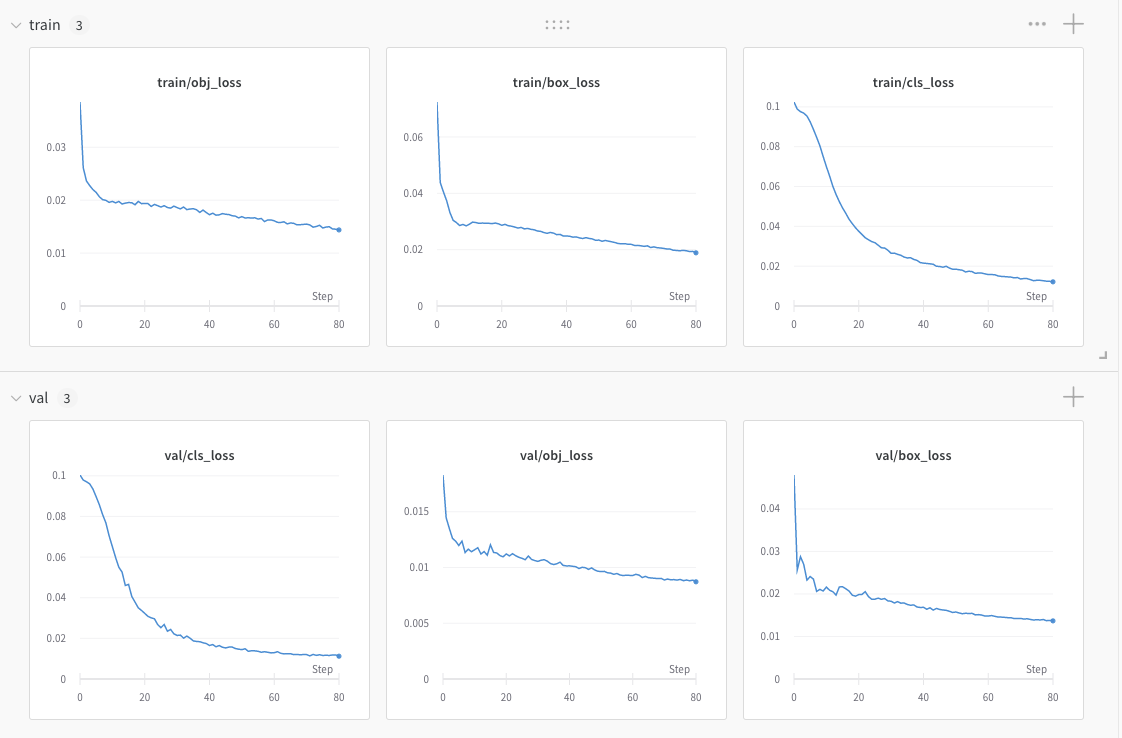
요로케 아름답게 실시간으로 상황을 볼 수 있다. 그리고 나중에는 같은 모델 학습시키는 거에 대해서 파라미터 값들 변경하면서 결과를 각각 확인하고 또 겹쳐서 확인할 수가 있어가지고 나중에 본격적으로 학습할때는 유용할 것 같당.
%load_ext tensorboard
%tensorboard --logdir runs/train
%pip install -q wandb
import wandb
wandb.login()
4) 본격적 학습
이제 데이터 세팅을 다 끝냈으므로 yolov5 simple trainig 가이드에 적힌대로 train.py 코드 이용해서 모델 학습시켜주면 된다. 여기서 epoch이랑 img, batch 사이즈 등등을 조절 할 수있는데 처음에 50 써야할 거를 5 적고 엥 뭐야 왤케 빨라 역시 쥐피유인가;; 이랬는데 알고보니 5였어서 다시 epoch 수 100으로 조정하고 지금 학습시키느중 이제 79 에폭왔다 여기까지 오는데 딱 1시간… 1에폭에 한 50초 정도 걸리는건가..? 몰라.. 암튼 학습시켜놓고 밥먹고오고나 한숨자고 오거나 동숲 애기들한테 선물 하나씩 돌리고 정비좀하고오면 되있을 듯 ㅋㅋ ㅋ
학습이 끝났다
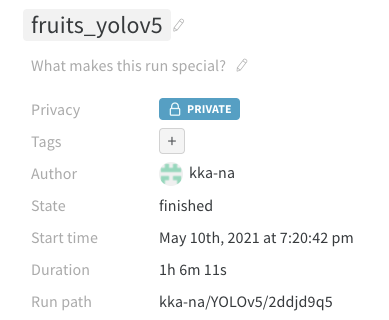
이미지 5000장을 8:2로 나누고, batch는 16 epoch은 100 이미지 크기는 416으로 한 결과 총 1시간 6분의 트레이닝 시간이 걸렸다. 클래스 수는 63개…?
!python train.py --img 416 --batch 16 --epochs 100 --data /content/fruit_data/data.yaml --weights yolov5s.pt --name fruits_yolov5 --nosave --cache
[34m[1mgithub: [0m⚠️ WARNING: code is out of date by 1 commit. Use 'git pull' to update or 'git clone https://github.com/ultralytics/yolov5' to download latest.
YOLOv5 🚀 v5.0-76-g57b0d3a torch 1.8.1+cu101 CUDA:0 (Tesla T4, 15109.75MB)
Namespace(adam=False, artifact_alias='latest', batch_size=16, bbox_interval=-1, bucket='', cache_images=True, cfg='', data='/content/fruit_data/data.yaml', device='', entity=None, epochs=100, evolve=False, exist_ok=False, global_rank=-1, hyp='data/hyp.scratch.yaml', image_weights=False, img_size=[416, 416], label_smoothing=0.0, linear_lr=False, local_rank=-1, multi_scale=False, name='fruits_yolov5', noautoanchor=False, nosave=True, notest=False, project='runs/train', quad=False, rect=False, resume=False, save_dir='runs/train/fruits_yolov5', save_period=-1, single_cls=False, sync_bn=False, total_batch_size=16, upload_dataset=False, weights='yolov5s.pt', workers=8, world_size=1)
[34m[1mtensorboard: [0mStart with 'tensorboard --logdir runs/train', view at http://localhost:6006/
2021-05-10 10:20:40.525485: I tensorflow/stream_executor/platform/default/dso_loader.cc:49] Successfully opened dynamic library libcudart.so.11.0
[34m[1mhyperparameters: [0mlr0=0.01, lrf=0.2, momentum=0.937, weight_decay=0.0005, warmup_epochs=3.0, warmup_momentum=0.8, warmup_bias_lr=0.1, box=0.05, cls=0.5, cls_pw=1.0, obj=1.0, obj_pw=1.0, iou_t=0.2, anchor_t=4.0, fl_gamma=0.0, hsv_h=0.015, hsv_s=0.7, hsv_v=0.4, degrees=0.0, translate=0.1, scale=0.5, shear=0.0, perspective=0.0, flipud=0.0, fliplr=0.5, mosaic=1.0, mixup=0.0
[34m[1mwandb[0m: Currently logged in as: [33mkka-na[0m (use `wandb login --relogin` to force relogin)
2021-05-10 10:20:42.751675: I tensorflow/stream_executor/platform/default/dso_loader.cc:49] Successfully opened dynamic library libcudart.so.11.0
[34m[1mwandb[0m: Tracking run with wandb version 0.10.30
[34m[1mwandb[0m: Syncing run [33mfruits_yolov5[0m
[34m[1mwandb[0m: ⭐️ View project at [34m[4mhttps://wandb.ai/kka-na/YOLOv5[0m
[34m[1mwandb[0m: 🚀 View run at [34m[4mhttps://wandb.ai/kka-na/YOLOv5/runs/2ddjd9q5[0m
[34m[1mwandb[0m: Run data is saved locally in /content/yolov5/wandb/run-20210510_102041-2ddjd9q5
[34m[1mwandb[0m: Run `wandb offline` to turn off syncing.
Overriding model.yaml nc=80 with nc=63
from n params module arguments
0 -1 1 3520 models.common.Focus [3, 32, 3]
1 -1 1 18560 models.common.Conv [32, 64, 3, 2]
2 -1 1 18816 models.common.C3 [64, 64, 1]
3 -1 1 73984 models.common.Conv [64, 128, 3, 2]
4 -1 1 156928 models.common.C3 [128, 128, 3]
5 -1 1 295424 models.common.Conv [128, 256, 3, 2]
6 -1 1 625152 models.common.C3 [256, 256, 3]
7 -1 1 1180672 models.common.Conv [256, 512, 3, 2]
8 -1 1 656896 models.common.SPP [512, 512, [5, 9, 13]]
9 -1 1 1182720 models.common.C3 [512, 512, 1, False]
10 -1 1 131584 models.common.Conv [512, 256, 1, 1]
11 -1 1 0 torch.nn.modules.upsampling.Upsample [None, 2, 'nearest']
12 [-1, 6] 1 0 models.common.Concat [1]
13 -1 1 361984 models.common.C3 [512, 256, 1, False]
14 -1 1 33024 models.common.Conv [256, 128, 1, 1]
15 -1 1 0 torch.nn.modules.upsampling.Upsample [None, 2, 'nearest']
16 [-1, 4] 1 0 models.common.Concat [1]
17 -1 1 90880 models.common.C3 [256, 128, 1, False]
18 -1 1 147712 models.common.Conv [128, 128, 3, 2]
19 [-1, 14] 1 0 models.common.Concat [1]
20 -1 1 296448 models.common.C3 [256, 256, 1, False]
21 -1 1 590336 models.common.Conv [256, 256, 3, 2]
22 [-1, 10] 1 0 models.common.Concat [1]
23 -1 1 1182720 models.common.C3 [512, 512, 1, False]
24 [17, 20, 23] 1 183396 models.yolo.Detect [63, [[10, 13, 16, 30, 33, 23], [30, 61, 62, 45, 59, 119], [116, 90, 156, 198, 373, 326]], [128, 256, 512]]
Model Summary: 283 layers, 7230756 parameters, 7230756 gradients, 16.9 GFLOPS
Transferred 356/362 items from yolov5s.pt
Scaled weight_decay = 0.0005
Optimizer groups: 62 .bias, 62 conv.weight, 59 other
[34m[1mtrain: [0mScanning '/content/fruit_data/train.cache' images and labels... 4000 foun[0m
[34m[1mtrain: [0mCaching images (1.6GB): 100%|███████| 4000/4000 [00:13<00:00, 300.76it/s][0m
[34m[1mval: [0mScanning '/content/fruit_data/val.cache' images and labels... 1000 found, 0[0m
[34m[1mval: [0mCaching images (0.4GB): 100%|█████████| 1000/1000 [00:04<00:00, 202.04it/s][0m
Plotting labels...
[34m[1mautoanchor: [0mAnalyzing anchors... anchors/target = 6.19, Best Possible Recall (BPR) = 1.0000
Image sizes 416 train, 416 test
Using 2 dataloader workers
Logging results to runs/train/fruits_yolov5
Starting training for 100 epochs...
Epoch gpu_mem box obj cls total labels img_size
0/99 1.64G 0.07242 0.03856 0.1024 0.2134 101 416
Class Images Labels P R mAP@.5
all 1000 2774 0.0142 0.324 0.0146 0.00647
Images sizes do not match. This will causes images to be display incorrectly in the UI.
Epoch gpu_mem box obj cls total labels img_size
1/99 1.38G 0.04382 0.02614 0.09887 0.1688 72 416
Class Images Labels P R mAP@.5
all 1000 2774 0.0171 0.585 0.0219 0.0155
Epoch gpu_mem box obj cls total labels img_size
2/99 1.38G 0.04047 0.02362 0.0976 0.1617 75 416
Class Images Labels P R mAP@.5
all 1000 2774 0.029 0.169 0.028 0.0185
Epoch gpu_mem box obj cls total labels img_size
3/99 1.38G 0.03731 0.02275 0.09686 0.1569 84 416
Class Images Labels P R mAP@.5
all 1000 2774 0.0331 0.295 0.0435 0.0294
Epoch gpu_mem box obj cls total labels img_size
4/99 1.38G 0.03314 0.022 0.09538 0.1505 68 416
Class Images Labels P R mAP@.5
all 1000 2774 0.0509 0.312 0.0636 0.045
Epoch gpu_mem box obj cls total labels img_size
5/99 1.38G 0.0304 0.02146 0.09248 0.1443 61 416
Class Images Labels P R mAP@.5
all 1000 2774 0.0674 0.367 0.106 0.0719
Epoch gpu_mem box obj cls total labels img_size
6/99 1.38G 0.02962 0.02063 0.08869 0.1389 90 416
Class Images Labels P R mAP@.5
all 1000 2774 0.144 0.424 0.162 0.105
Epoch gpu_mem box obj cls total labels img_size
7/99 1.38G 0.02856 0.0201 0.08467 0.1333 101 416
Class Images Labels P R mAP@.5
all 1000 2774 0.344 0.349 0.246 0.174
Epoch gpu_mem box obj cls total labels img_size
8/99 1.38G 0.02896 0.01997 0.08042 0.1293 73 416
Class Images Labels P R mAP@.5
all 1000 2774 0.33 0.427 0.3 0.231
Epoch gpu_mem box obj cls total labels img_size
9/99 1.38G 0.02845 0.01958 0.07511 0.1231 81 416
Class Images Labels P R mAP@.5
all 1000 2774 0.34 0.491 0.383 0.292
Epoch gpu_mem box obj cls total labels img_size
10/99 1.38G 0.02903 0.01978 0.07002 0.1188 82 416
Class Images Labels P R mAP@.5
all 1000 2774 0.444 0.493 0.446 0.334
Epoch gpu_mem box obj cls total labels img_size
11/99 1.38G 0.02978 0.01949 0.06525 0.1145 92 416
Class Images Labels P R mAP@.5
all 1000 2774 0.543 0.508 0.524 0.399
Epoch gpu_mem box obj cls total labels img_size
12/99 1.38G 0.02962 0.01976 0.06012 0.1095 79 416
Class Images Labels P R mAP@.5
all 1000 2774 0.67 0.533 0.572 0.427
Epoch gpu_mem box obj cls total labels img_size
13/99 1.38G 0.02934 0.01928 0.05597 0.1046 94 416
Class Images Labels P R mAP@.5
all 1000 2774 0.691 0.546 0.598 0.466
Epoch gpu_mem box obj cls total labels img_size
14/99 1.38G 0.02944 0.01944 0.0524 0.1013 70 416
Class Images Labels P R mAP@.5
all 1000 2774 0.735 0.613 0.69 0.508
Epoch gpu_mem box obj cls total labels img_size
15/99 1.38G 0.02938 0.01955 0.04922 0.09815 83 416
Class Images Labels P R mAP@.5
all 1000 2774 0.709 0.593 0.664 0.505
Epoch gpu_mem box obj cls total labels img_size
16/99 1.38G 0.02936 0.01952 0.04654 0.09542 68 416
Class Images Labels P R mAP@.5
all 1000 2774 0.703 0.69 0.747 0.565
Epoch gpu_mem box obj cls total labels img_size
17/99 1.38G 0.02923 0.01913 0.04358 0.09195 89 416
Class Images Labels P R mAP@.5
all 1000 2774 0.71 0.736 0.766 0.59
Epoch gpu_mem box obj cls total labels img_size
18/99 1.38G 0.02944 0.01977 0.04136 0.09058 76 416
Class Images Labels P R mAP@.5
all 1000 2774 0.757 0.735 0.789 0.618
Epoch gpu_mem box obj cls total labels img_size
19/99 1.38G 0.02917 0.01934 0.0393 0.08782 77 416
Class Images Labels P R mAP@.5
all 1000 2774 0.788 0.755 0.804 0.631
Epoch gpu_mem box obj cls total labels img_size
20/99 1.38G 0.02866 0.01937 0.03752 0.08555 71 416
Class Images Labels P R mAP@.5
all 1000 2774 0.763 0.776 0.816 0.642
Epoch gpu_mem box obj cls total labels img_size
21/99 1.38G 0.02899 0.01935 0.03594 0.08427 92 416
Class Images Labels P R mAP@.5
all 1000 2774 0.757 0.802 0.832 0.655
. . . . . . . . . . . . . . . . . . . . . . . . . . . . . . . . . . . . . . . . . . . .
Epoch gpu_mem box obj cls total labels img_size
90/99 1.38G 0.01832 0.01411 0.01152 0.04395 81 416
Class Images Labels P R mAP@.5
all 1000 2774 0.972 0.921 0.958 0.847
Epoch gpu_mem box obj cls total labels img_size
91/99 1.38G 0.01845 0.01396 0.01123 0.04365 75 416
Class Images Labels P R mAP@.5
all 1000 2774 0.963 0.928 0.959 0.846
Epoch gpu_mem box obj cls total labels img_size
92/99 1.38G 0.01832 0.01407 0.01111 0.0435 47 416
Class Images Labels P R mAP@.5
all 1000 2774 0.974 0.916 0.959 0.849
Epoch gpu_mem box obj cls total labels img_size
93/99 1.38G 0.01815 0.01382 0.01088 0.04285 60 416
Class Images Labels P R mAP@.5
all 1000 2774 0.972 0.926 0.96 0.85
Epoch gpu_mem box obj cls total labels img_size
94/99 1.38G 0.01803 0.01372 0.01113 0.04288 64 416
Class Images Labels P R mAP@.5
all 1000 2774 0.965 0.928 0.959 0.849
Epoch gpu_mem box obj cls total labels img_size
95/99 1.38G 0.01798 0.01395 0.011 0.04294 95 416
Class Images Labels P R mAP@.5
all 1000 2774 0.968 0.919 0.957 0.848
Epoch gpu_mem box obj cls total labels img_size
96/99 1.38G 0.01793 0.01379 0.01076 0.04249 114 416
Class Images Labels P R mAP@.5
all 1000 2774 0.971 0.916 0.955 0.847
Epoch gpu_mem box obj cls total labels img_size
97/99 1.38G 0.01784 0.01374 0.01071 0.04229 86 416
Class Images Labels P R mAP@.5
all 1000 2774 0.966 0.925 0.957 0.849
Epoch gpu_mem box obj cls total labels img_size
98/99 1.38G 0.01775 0.01376 0.01043 0.04195 81 416
Class Images Labels P R mAP@.5
all 1000 2774 0.968 0.922 0.958 0.85
Epoch gpu_mem box obj cls total labels img_size
99/99 1.38G 0.01825 0.01396 0.01112 0.04333 57 416
Class Images Labels P R mAP@.5
all 1000 2774 0.965 0.923 0.958 0.85
100 epochs completed in 1.094 hours.
Optimizer stripped from runs/train/fruits_yolov5/weights/last.pt, 14.7MB
Optimizer stripped from runs/train/fruits_yolov5/weights/best.pt, 14.7MB
Images sizes do not match. This will causes images to be display incorrectly in the UI.
[34m[1mwandb[0m: Waiting for W&B process to finish, PID 1170
[34m[1mwandb[0m: Program ended successfully.
[34m[1mwandb[0m:
[34m[1mwandb[0m: Find user logs for this run at: /content/yolov5/wandb/run-20210510_102041-2ddjd9q5/logs/debug.log
[34m[1mwandb[0m: Find internal logs for this run at: /content/yolov5/wandb/run-20210510_102041-2ddjd9q5/logs/debug-internal.log
[34m[1mwandb[0m: Run summary:
[34m[1mwandb[0m: train/box_loss 0.01825
[34m[1mwandb[0m: train/obj_loss 0.01396
[34m[1mwandb[0m: train/cls_loss 0.01112
[34m[1mwandb[0m: metrics/precision 0.96455
[34m[1mwandb[0m: metrics/recall 0.92256
[34m[1mwandb[0m: metrics/mAP_0.5 0.95761
[34m[1mwandb[0m: metrics/mAP_0.5:0.95 0.85019
[34m[1mwandb[0m: val/box_loss 0.01318
[34m[1mwandb[0m: val/obj_loss 0.0085
[34m[1mwandb[0m: val/cls_loss 0.01096
[34m[1mwandb[0m: x/lr0 0.00201
[34m[1mwandb[0m: x/lr1 0.00201
[34m[1mwandb[0m: x/lr2 0.00201
[34m[1mwandb[0m: _runtime 3969
[34m[1mwandb[0m: _timestamp 1620646010
[34m[1mwandb[0m: _step 100
[34m[1mwandb[0m: Run history:
[34m[1mwandb[0m: train/box_loss █▄▃▂▂▃▂▂▂▂▂▂▂▂▂▂▂▂▂▂▂▂▂▂▂▁▁▁▁▁▁▁▁▁▁▁▁▁▁▁
[34m[1mwandb[0m: train/obj_loss █▄▃▃▃▃▃▃▃▂▂▂▂▂▂▂▂▂▂▂▂▂▂▂▂▂▂▁▁▁▁▁▁▁▁▁▁▁▁▁
[34m[1mwandb[0m: train/cls_loss ██▇▇▆▅▄▄▃▃▃▂▂▂▂▂▂▂▂▂▂▁▁▁▁▁▁▁▁▁▁▁▁▁▁▁▁▁▁▁
[34m[1mwandb[0m: metrics/precision ▁▁▁▃▄▆▆▆▆▇▇▇▇▇▇█████████████████████████
[34m[1mwandb[0m: metrics/recall ▂▁▃▃▄▄▅▆▇▇▇▇▇▇▇▇████████████████████████
[34m[1mwandb[0m: metrics/mAP_0.5 ▁▁▂▃▄▅▆▇▇▇▇▇████████████████████████████
[34m[1mwandb[0m: metrics/mAP_0.5:0.95 ▁▁▂▂▄▄▅▆▆▆▇▇▇▇▇▇▇▇██████████████████████
[34m[1mwandb[0m: val/box_loss █▄▃▂▃▂▃▃▂▂▂▂▂▂▂▂▂▂▂▂▂▁▁▁▁▁▁▁▁▁▁▁▁▁▁▁▁▁▁▁
[34m[1mwandb[0m: val/obj_loss █▅▃▃▃▃▄▃▃▃▃▃▂▂▂▂▂▂▂▂▂▂▂▂▂▁▁▁▁▁▁▁▁▁▁▁▁▁▁▁
[34m[1mwandb[0m: val/cls_loss ██▇▆▅▄▄▃▃▃▂▂▂▂▂▂▁▁▁▁▁▁▁▁▁▁▁▁▁▁▁▁▁▁▁▁▁▁▁▁
[34m[1mwandb[0m: x/lr0 ▁▆██████▇▇▇▇▇▆▆▆▆▅▅▅▅▄▄▄▄▃▃▃▂▂▂▂▂▂▁▁▁▁▁▁
[34m[1mwandb[0m: x/lr1 ▁▆██████▇▇▇▇▇▆▆▆▆▅▅▅▅▄▄▄▄▃▃▃▂▂▂▂▂▂▁▁▁▁▁▁
[34m[1mwandb[0m: x/lr2 █▄▂▂▂▂▂▂▂▂▂▂▂▂▂▂▁▁▁▁▁▁▁▁▁▁▁▁▁▁▁▁▁▁▁▁▁▁▁▁
[34m[1mwandb[0m: _runtime ▁▁▁▂▂▂▂▂▂▃▃▃▃▃▃▄▄▄▄▄▅▅▅▅▅▆▆▆▆▆▆▇▇▇▇▇▇███
[34m[1mwandb[0m: _timestamp ▁▁▁▂▂▂▂▂▂▃▃▃▃▃▃▄▄▄▄▄▅▅▅▅▅▆▆▆▆▆▆▇▇▇▇▇▇███
[34m[1mwandb[0m: _step ▁▁▁▁▂▂▂▂▂▃▃▃▃▃▃▄▄▄▄▄▅▅▅▅▅▅▆▆▆▆▆▇▇▇▇▇▇███
[34m[1mwandb[0m:
[34m[1mwandb[0m: Synced 5 W&B file(s), 337 media file(s), 1 artifact file(s) and 0 other file(s)
[34m[1mwandb[0m:
[34m[1mwandb[0m: Synced [33mfruits_yolov5[0m: [34mhttps://wandb.ai/kka-na/YOLOv5/runs/2ddjd9q5[0m
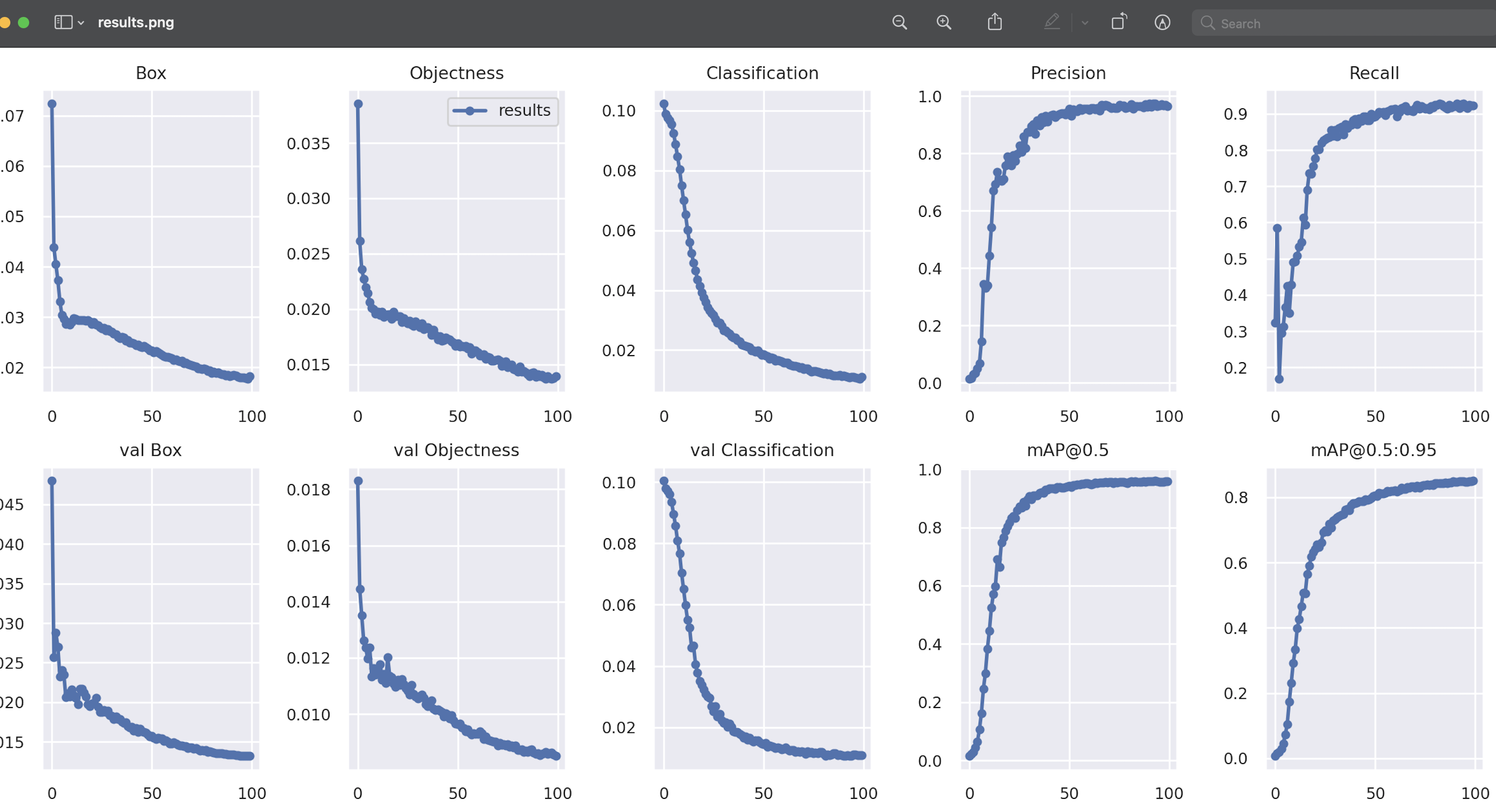
학습 결과
5) 테스트!
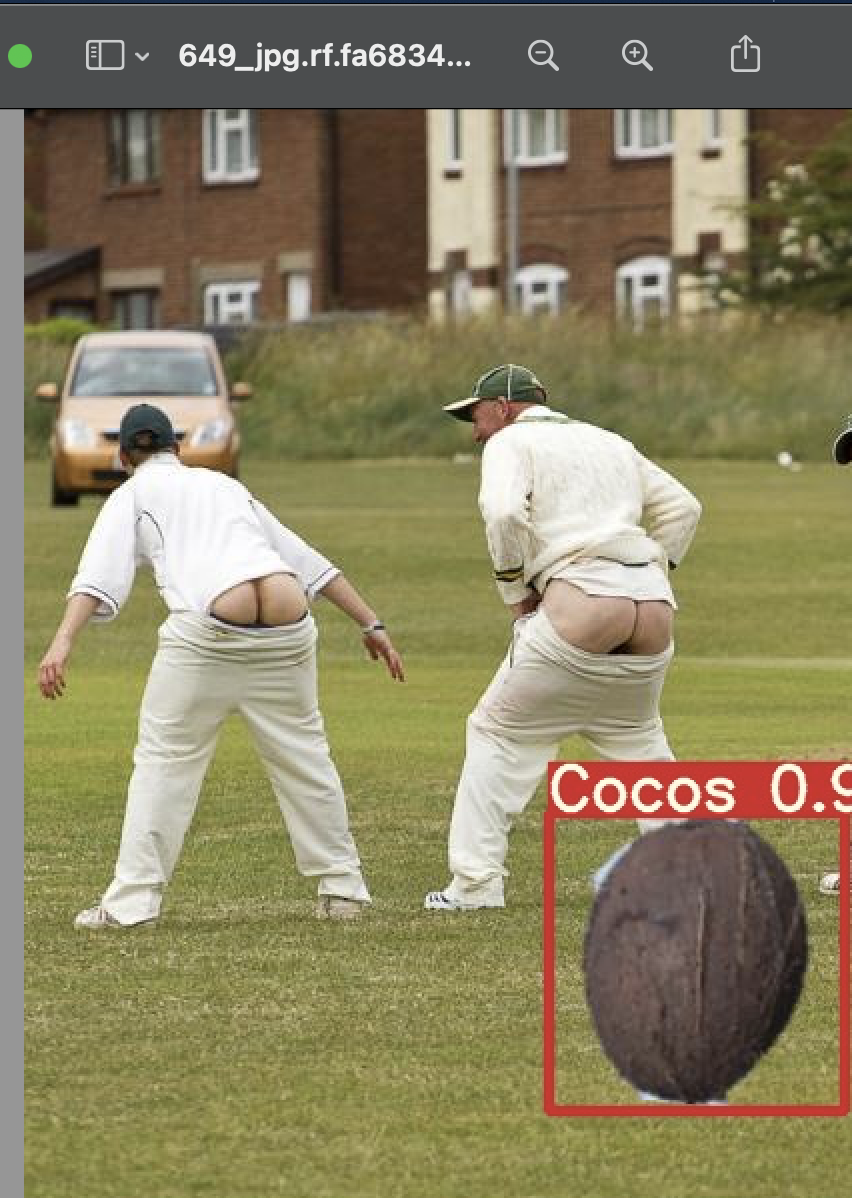
학습이 다 됐으면 이제 yolov5 코드 중에서 detect.py 코드를 이용하고 weight는 best.pt 모델을 고르고, 테스트로 사용할 이미지는 validation이미지 리스트에서 3번째 이미지를가져왔다.
엉툭튀가 당황스럽긴하지만 트레이닝이 잘 된것을 확인할 수 있다!!!
from IPython.display import Image
import os

val_img_path = val_img_list[3]
!python detect.py --weights /content/yolov5/runs/train/fruits_yolov5/weights/best.pt --img 416 --conf 0.5 --source "{val_img_path}"
Namespace(agnostic_nms=False, augment=False, classes=None, conf_thres=0.5, device='', exist_ok=False, hide_conf=False, hide_labels=False, img_size=416, iou_thres=0.45, line_thickness=3, name='exp', nosave=False, project='runs/detect', save_conf=False, save_crop=False, save_txt=False, source='/content/fruit_data/train/images/649_jpg.rf.fa6834f7f7fe50a01c5f99f94c6706e5.jpg', update=False, view_img=False, weights=['/content/yolov5/runs/train/fruits_yolov5/weights/best.pt'])
YOLOv5 🚀 v5.0-76-g57b0d3a torch 1.8.1+cu101 CUDA:0 (Tesla T4, 15109.75MB)

Fusing layers...
Model Summary: 224 layers, 7221124 parameters, 0 gradients, 16.9 GFLOPS
image 1/1 /content/fruit_data/train/images/649_jpg.rf.fa6834f7f7fe50a01c5f99f94c6706e5.jpg: 416x320 1 Cocos, Done. (0.010s)
Results saved to runs/detect/exp4
Done. (0.025s)